
Imagine you arrive at a website, click a button, but nothing happens. Or you try to navigate but end up lost in menus. Frustrating, right? In a digital world where attention spans are short, this kind of friction can make people leave in seconds. That’s why UI/UX design conversion rates matter so much. A thoughtful user interface and experience can make the difference between a visitor bouncing away and becoming a loyal customer.
For software development agencies, optimizing UI/UX isn’t just about making things look pretty; it’s about guiding users smoothly, building trust, and helping businesses meet their goals. When done right, good design leads to higher signups, better engagement, and more revenue.
In this blog, we explore how UI/UX affects conversions, share real-world examples and proven design practices, and explain how your agency can deliver high-converting digital products. Whether you build e-commerce sites, SaaS dashboards, or content platforms, the design choices you make can directly impact business success.
Why UI/UX Matters for Conversions
A well-designed interface does more than please the eye. It shapes how users feel, how easily they complete tasks, and whether they trust the product. Here’s why UI/UX plays a key role in driving conversion:
- First impressions count: Users often decide within seconds if they’ll stay or leave. Clean, modern, and intuitive design builds trust immediately.
- Ease of use reduces friction: When actions are clear — buttons are obvious, flows are simple — users complete tasks faster and with less frustration.
- Trust and credibility: Design elements such as consistent branding, readable fonts, and professional visuals instill confidence. Users who trust a site are more likely to convert.
- Emotional comfort: Good UX feels natural. Users feel in control, which encourages them to explore, engage, and act (buy, sign up, contact).
In short, when people don’t struggle, they stay. When they feel welcomed and guided, they convert.
Real-World Examples: UI/UX Making a Difference
Example 1: Simplified Checkout Flow
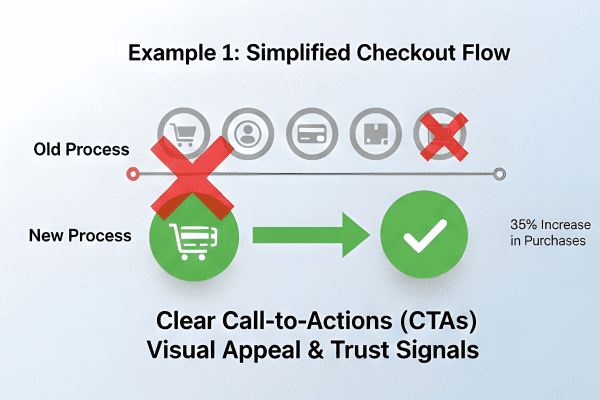
An online store reduced its checkout pages from five steps to two. By simplifying form fields, showing a progress bar, and enabling guest checkout, they saw a 35% increase in completed purchases.
Example 2: Improved Navigation & Onboarding
A SaaS product revamped its homepage and onboarding process. Clear headings, simple instructions, and a friendly welcome tour helped new users’ complete signup and first-use tasks faster. —result: 50% growth in user activation in one month.
Example 3: Mobile-Friendly Redesign
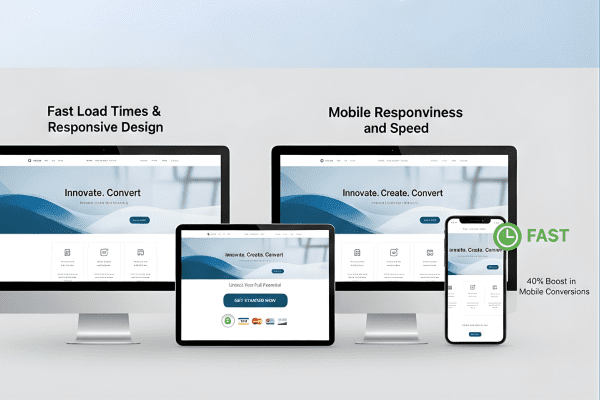
A content platform optimized its site for mobile — faster loading, larger touch targets, simplified menus. Mobile conversions increased by 40%, showing how responsive UI/UX design can directly boost results.
These examples show that even small changes — when aligned with good UI/UX practices — can lead to significant improvements.
Key UI/UX Best Practices to Boost Conversion Rates
1. Clear Navigation & Logical Layout
Users should know where to click next without thinking. Use clear menus, simple page structure, and visible buttons. Keep necessary actions (“Buy Now,” “Sign Up,” “Get Started”) above the fold.
2. Fast Load Times & Responsive Design
Speed matters. Pages must load quickly — especially on mobile. Slow load times frustrate users and reduce conversions. Use optimized images, efficient code, and responsive layouts.
3. Visual Appeal & Trust Signals
Design should look professional and clean. Use consistent colors, readable fonts, and good spacing. Add trust signals—testimonials, secure badges, clear contact info— to help users feel confident.
4. Minimalist Forms & Simple Paths
Long forms or complex processes drive users away. Ask only for essential information. Use clear labels, autofill when possible, and show progress. Simplified forms help improve conversion rates.
5. Clear Call-to-Actions (CTAs)
Buttons should stand out. Use contrasting colors, precise wording (“Start Free Trial,” “Download Guide,” “Subscribe”), and position CTAs where users naturally look. Avoid clutter around them.
6. Consistent Experience Across Devices
Users switch between desktop, tablet, and mobile. Ensure UI/UX stays consistent across devices. This builds familiarity and reduces confusion, which helps conversions.
7. Feedback, Micro-Interactions & Error Handling
Show feedback when users click buttons: loading spinners, success messages, and error hints. Clear feedback makes users feel in control — reducing frustration and improving trust.
8. Accessibility & Inclusive Design
Design for all users. Use readable fonts, high color contrast, proper alt text for images, and keyboard navigation. Accessible UI/UX helps more people use your product — and increases potential conversions.
How Agencies Can Deliver High-Converting UI/UX
As a software development agency, you can become a conversion partner:
- Start with user research: Understand who the users are and what they need. Design for real people, not assumptions.
- Prototype & test: Build wireframes and gather feedback with real users. Early testing helps spot issues before development.
- Iterate after launch: Use analytics and user feedback to make improvements. Conversion optimization is continuous.
- Follow standards and best practices: Use fast frameworks, responsive layouts, and accessible design.
- Measure conversions: Track signup rates, bounce rates, and click-throughs. Use this data to refine UI/UX decisions.
Real Example – Human-Centered UI/UX in Action
Want to see how human-centered UI/UX turns into real results? Check out this detailed case: Human-Centered UI/UX Design for Better User Engagement. This example walks through how clean design, user-friendly navigation, and thoughtful UX helped improve user satisfaction and engagement, the first step toward better conversion rates.
Conclusion
The truth is simple: design matters. In a crowded digital space where users judge products in seconds, UI/UX design conversion rates are increasingly critical. A well-designed interface and an intuitive user journey can be the difference between a user leaving and one becoming a customer, subscriber, or loyal user.
When UI/UX is done right, users feel comfortable, trust the product, and are more likely to take action. Whether it’s purchasing a product, subscribing to a service, or filling out a form, thoughtful design makes these actions easy and inviting. Clean navigation, clear CTAs, quick load times, and visual trust all contribute to a smoother experience and higher conversions.
For software development agencies, this offers a powerful opportunity. By combining technical expertise with user-centered design, you deliver products that not only work — but also convert. You build platforms that last, scale, and grow with users. And you help clients meet their goals: more sales, higher engagement, and stronger retention.
The path to higher conversion rates doesn’t always lie in more features or aggressive marketing. Often, it starts with empathy — understanding what users need and designing for that need. It begins with clarity, simplicity, and respect for the user’s time and attention. And it continues with continuous improvement, feedback, and adaptation.
If you aim to build web apps that don’t just function, but truly serve users — apps that feel reliable, intuitive, and trustworthy — putting effort into UI/UX is not optional. It is essential. And if done right, the results speak for themselves: satisfied users, growing engagement, and improved conversion rates.