
Why WordPress powers 40% of websites is a question many business owners ask when they plan a new site, store, or landing page. The short answer is simple: WordPress helps you launch faster, market better, and grow without locking you into one vendor. It is flexible, cost-friendly, and easy to manage, even if you are not technical. If you want to build a business site that supports sales, SEO, and future upgrades, WordPress is often the safest bet.
At Ropstam, we build mobile app and business websites that work together, so your site can support your app, campaigns, and customer journeys. If you want to start your (project), visit this page. In this guide, you will learn what WordPress is, how it works, why it leads in WordPress market share, and how to decide if it fits your business goals.

Business team planning a WordPress website with laptop and mobile view
Why WordPress Matters for Modern Businesses
Today, your website is often your:
- first sales call
- first customer support desk
- first brand impression
- main lead engine
WordPress supports these business needs with:
- fast website launches for new offers
- simple content updates for marketing teams
- strong SEO setup for long-term traffic
- easy add-ons for forms, booking, and payments
If you are comparing platforms, remember this: Why these powers 40% of websites is also tied to how quickly companies can test, learn, and improve.
WordPress popularity is strong because it works for many industries:
- services and B2B
- eCommerce and subscriptions
- healthcare and education
- media, blogs, and communities
What Is WordPress CMS and How WordPress Works
Many beginners ask, what is WordPress CMS, and why it feels easier than custom code.
WordPress is a content management system (CMS). It lets you build and manage web pages using a dashboard.
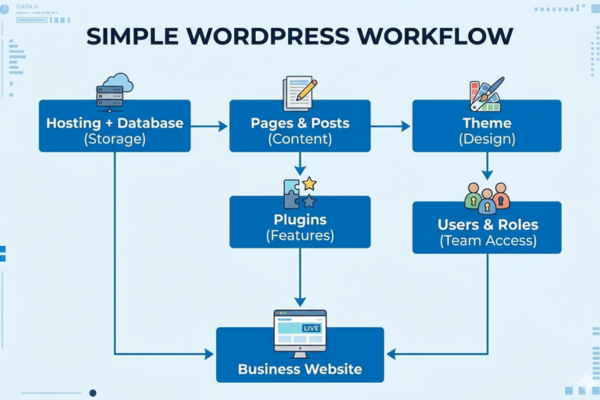
How WordPress works (simple view)
- Themes control the look and layout
- Plugins add features (forms, SEO, payments)
- Pages and posts hold your content
- Users and roles control access for your team
- Hosting + database store your site files and content
WordPress for beginners: what you manage day to day
- update text and images
- publish blogs and landing pages
- create menus and banners
- track leads from forms
- connect analytics and ads
For business owners, why use WordPress often comes down to one thing: you can move faster without waiting on developers for every small change.
What Is WordPress Website Development for Business?
Featured definition (snippet ready)
What is WordPress website development for business?
It is the process of building a business website on WordPress with the right design, pages, plugins, security, and integrations to support marketing, sales, and growth.
When people search Why powers 40% of websites, they often want proof it is not just for blogs. Modern WordPress is used for:
- company websites
- online stores
- lead-generation funnels
- learning platforms
- customer portals (with the right setup)
A strong business build includes:
- clear site structure for SEO
- mobile-first layout
- fast loading pages
- secure login and backups
- integrations with CRM, email, and payments
Why WordPress Powers 40% of Websites: The Core Reasons
1) It is easy to start, even for non-technical teams
- simple dashboard
- common tasks need no code
- marketing teams can publish faster
2) It scales from small sites to large brands
- start with 5 pages
- grow into 500+ pages
- add new features step by step
This is a key reason Why the power of word press 40% of websites: the same platform can support early-stage and enterprise needs.
3) It supports SEO better than many builders
- clean page structure options
- strong plugin ecosystem
- easy blog and content tools
4) It has a huge ecosystem
- thousands of themes
- plugins for almost every need
- large global talent pool
In business terms, reasons to choose WordPress often include lower risk. If one vendor fails, you can still find support.
5) Ownership and control
- you own your content
- you can change hosting
- you can switch agencies
This control is a major part of Why powers 40% of websites in the long run.
Benefits of WordPress for Business Growth (Business Value Section)
If you care about growth, the benefits of WordPress are easiest to see in daily operations.
Benefits of WordPress for business growth include:
- reduced website update costs
- faster campaign launches
- better SEO and content output
- higher lead quality with better landing pages
- improved trust with strong design and speed
- easier A/B testing and iteration
- smoother integrations with sales tools
Business owners choose WordPress because:
- it supports content marketing at scale
- it keeps your brand consistent
- it helps you build authority over timeExplore this business transformation case study (real life example): explore this business transformation case study. Focus on how product thinking and delivery discipline turn a website into a growth tool.
Feature | Benefit (business-focused table)
| Feature | Benefit |
| SEO-friendly structure | Higher search visibility and more inbound leads |
| Mobile responsive design | Better conversions from mobile traffic |
| Plugin support | Add features without rebuilding the site |
| Custom integrations | Connect CRM, email, and analytics for growth |
| Scalable hosting setup | Handle traffic spikes during campaigns |
| Role-based access | Let teams work safely without breaking pages |
When buyers compare advantages of WordPress website builds to other options, these practical benefits usually win.
WordPress Market Share and WordPress Popularity: What the Numbers Mean
People see headlines about WordPress market share and ask if it is hype. It is not. The real takeaway is business stability.
Why these powers 40% of websites is linked to:
- long-term platform maturity
- constant improvements
- a large user and developer community
What this means for your business:
- more hiring options
- more plugin choices
- more agencies to support you
- more documentation and learning resources
In simple terms, WordPress popularity reduces risk. You are not betting your revenue on a platform that might disappear.
CMS market share infographic showing WordPress as the largest platform.
WordPress vs Other CMS: A Simple Comparison for Buyers
A common question is WordPress vs other CMS platforms like Shopify, Webflow, Wix, Joomla, Drupal, or custom builds.
Here is a simple buyer-focused view:
- WordPress: best for flexible business sites and content-driven growth
- Shopify: best for store first businesses that want a guided setup
- Webflow/Wix: best for quick brochure sites with limited custom needs
- Drupal: strong for complex enterprise needs, but harder to manage
- Custom CMS: full control, but higher cost and ongoing dependency
So, why use WordPress instead of another CMS?
- more flexibility than many builders
- more content power than many store-first platforms
- easier team adoption than many enterprise CMS tools
This is a big reason. it fits the “middle path” where most businesses live fast to launch, but still customizable.
Cost of a WordPress Website: A Practical Pricing Guide
Cost matters. And Why 40% of websites is partly because it can fit different budgets.
Your cost depends on:
- number of pages
- design level (template vs custom)
- integrations (CRM, payment, booking)
- content migration needs
- performance and security level
Estimated WordPress build costs (table)
| WordPress Service Type | Estimated Cost |
| Starter business website (5–10 pages) | $3k – $8k |
| Custom WordPress design + SEO setup | $8k – $20k |
| WordPress eCommerce (WooCommerce) | $12k – $40k |
| Membership / LMS / subscription site | $20k – $60k |
| Enterprise WordPress + integrations | $50k+ |
Ongoing costs often include:
- hosting
- premium plugins (if needed)
- maintenance and security updates
- content and SEO support
Scalable WordPress Solutions for Businesses (Web + Mobile)
At Ropstam, we often build WordPress sites that support mobile app growth too. For example:
- the website becomes the marketing engine
- the mobile app becomes the retention engine
- both share content and user flows
Featured definition
What is a scalable WordPress solution for business?
It is a WordPress setup designed to grow with traffic, content, and features using clean design, strong hosting, secure plugins, and reliable integrations.
Scalable setup usually includes
- fast theme and page templates
- caching and image optimization
- clean plugin stack (no extra bloat)
- strong security (firewall, backups, updates)
- staging environment for safe changes
Integrations that drive business value
- CRM (for lead tracking)
- email marketing (for automation)
- payment gateways (for sales)
- analytics (for decision-making)
- customer support tools (for service speed)
To see how we approach business delivery, review this eCommerce success story (this case study): review this eCommerce success story. It shows how clear goals and the right build choices impact outcomes.
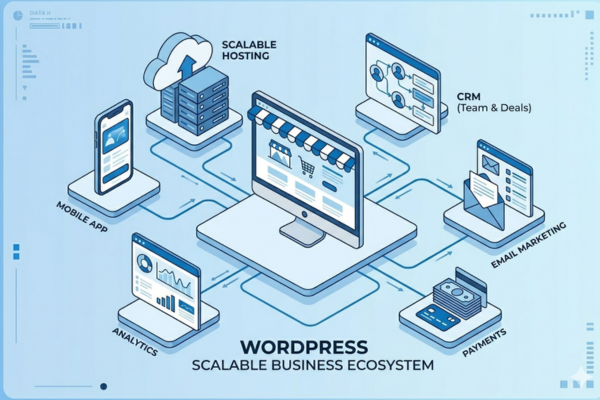
Scalable WordPress website connected to mobile app, CRM, analytics, and payments
Real-World Results: Case Studies That Show Business Impact
Business owners do not want theory. They want proof. Why WordPress powers 40% of websites is easier to trust when you see real delivery.
Here are real-life examples (and what to look for):
- faster launch timelines
- better user journeys on mobile
- improved conversion paths
- smoother content publishing
- stable performance during growth
You can also learn from this real client example (this case study): learn from this real client example. It highlights how the right build plan reduces long-term effort.
And if you want another angle on execution, see how we delivered results in this project (real life example): see how we delivered results in this project.
These examples connect to the same market truth: Why WordPress powers 40% of websites is not only features. It is the ability to deliver business results reliably.
AI, Automation, and Content: Where WordPress Is Going Next
WordPress keeps improving because businesses want smarter websites.
Common “next step” features include:
- AI-assisted content drafts
- smarter search on your site
- automated support chat
- better lead scoring and routing
You can connect AI tools to WordPress through APIs and plugins. If you explore AI for content or support, you may also want to read from trusted sources like OpenAI and the OpenAI Platform. For conversational experiences and knowledge-based flows, tools like arena.ai also show how AI can support customer journeys.
This future direction supports the same core point: Why WordPress powers 40% of websites is also about adaptability. WordPress can connect to modern tools without forcing a full rebuild.
Quick Checklist: Reasons to Choose WordPress (Without Regret)
If you are still deciding, use this buyer-friendly checklist. It explains reasons to choose WordPress in plain terms.
Choose WordPress if you need:
- strong SEO and content marketing
- fast landing pages for ads
- control over design and features
- ownership of your data and content
- many integration options
- a platform your team can learn
Be careful if:
- you want a store-only setup with minimal content needs (Shopify may be simpler)
- you want zero maintenance forever (no platform is truly “zero work”)
This checklist supports the main question again: Why WordPress powers 40% of websites is tied to how many business models it can serve well.
Start Your WordPress Development Project
A WordPress site should not be “just a website.” It should be a growth asset that supports SEO, lead generation, and product expansion. We build scalable WordPress solutions, custom builds, and business websites that work well on mobile and integrate with your tools.
If you want to start your (project), contact us here.
We can help with:
- WordPress for beginners (simple, guided setup)
- custom WordPress design and development
- WooCommerce stores and subscriptions
- performance, security, and maintenance
- integrations with CRM, analytics, and automation
- mobile-first UX that improves conversion
And yes, this is also Why WordPress powers 40% of websites: it works when the build is done with business goals first.
Conclusion:
Why WordPress powers 40% of websites comes down to practical business value. WordPress is flexible, proven, and easy to grow. It supports SEO, marketing speed, and long-term control. It also scales from simple sites to advanced platforms with eCommerce, memberships, and integrations.
Discover If your goal is a website that brings leads, supports campaigns, and grows with your business, WordPress is a strong choice. If you want to start your (project), contact us here.